 |
|
|
|
|
|
Overview
This document has been created to provide a brief look at the differences and possibilities provided with the introduction of Game Boy Color.
To prevent any unnecessary confusion, letís define a few terms:
| DMG/MGB | Literally "Dot Matrix Game" and "Miniature Game Boy", these terms refer to the original Game BoyÒ and Game BoyÒ pocket, respectively. |
| SGB | Super Game BoyÒ and Super Game BoyÒ II (Japan only) these are Game Boy adapters that plug into a NintendoÒ Super NES, allowing you to play Game Boy games on your SNES console. The Super Game Boy allowed you to apply four colors to a monochrome game. |
| GBC | Game Boy Color. Sometimes also referred to as CGB, an early designation before the official name was determined. |
| Character | A block of pixels (screen dots) either 8x8 or 8x16 that are referred to as a single unit. This is the smallest addressable unit of screen data on Game Boy systems. Each character utilizes a single color palette. |
| OBJ | ObjectóThese are groups of character data that are used to represent the main character and other moving objects which overlay the background in the game. (Sometimes referred to as "sprites".) |
| BG | BackgroundóAs it sounds, these are groups of characters laid out like tiles to create the environment or background of a game. |
| Color Palette | A group of four colors (or three plus a transparent color in the case of OBJs) each of which is a combination of red, green and blue components, mixed together to produce one of 32768 possible colors. |
| DMA | Direct Memory AccessóThis is a technology which provides fast transfer of data from one area of memory to another with minimal CPU intervention. For example, graphic data can be moved from cartridge memory to screen memory without first passing through the CPU. |
| OAM | Object Attribute MemoryóFor each object, a block of this memory is used to describe attributes such as palette, location, priority, etc. The area of memory used to hold these blocks is referred to as OAM. |
| MBC | Memory bank controlleróThis is a chip included in the Game Pak which allows the CPU to address memory beyond itís normal reach. By dividing the memory into "banks" and exchanging which banks are visible, a great deal of memory can be made addressable. |
Technical Differences between Game Boy and Game Boy Color
Basically, Game Boy Color is just what it sounds like, a Game Boy with a color screen; but there are some key technical differences in addition to the screen, described in the table below:
|
|
|
|
| Faster CPU | The original Game Boy CPU operates at 1.05Mhz, whereas the new Game Boy Color CPU can operate at 2.10Mhz. | This allows more sophisticated games with better artificial intelligence, and more complex game engines. |
| Expanded work RAM | The original Game Boy provides 8k bytes of work RAM (the RAM where the program actually resides during game play), Game Boy Color provides four times as much or 32k bytes. | Again this allows for more elaborate games, with more variety, levels, enemies or puzzles. |
| Expanded video RAM | Game Boy Color includes twice as much video RAM increasing from 8k bytes to 16k bytes. Twice as much character data | Necessary to support the addition of color data and more unique character data on screen. |
| High Speed DMA | Due to the increased amount of data necessary to display color images, Game Boy Colorís DMA (Direct Memory Access) has been enhanced to provide horizontal DMA (HDMA) and operates at the higher clock speed (regardless of CPU speed). | This allows the game to transfer data to the screen more quickly. It is necessary to support the additional data required for color, but also provides smoother scrolling and better animation. |
| BG character mirroring | Background character data (8x8 blocks of pixels) can be mirrored about the vertical or horizontal axis, providing more flexibility without having to create additional unique character data. | This reduces the redundancy of character data on screen without taking up more video RAM or Game Pak ROM space. |
| Wireless Infrared communications | Game Boy Color includes an infrared communications port at the top of the case. This will provide for data transfer from one Game Boy Color to another for such things as trading Pokémon. It is not intended to support head-to-head game play. | Wireless IR allows players to exchange data without purchasing or carrying a Game Link cable. The popularity of games involving data sharing is growing tremendously. |
| Enhanced serial communications | Game Boy Color includes a "serial port" for a Game Link cable, as does the original Game Boy, although Game Boy was limited to 8k bit/second data transfer. Game Boy Color increases this rate as high as 512k bit/second, depending on the operating mode. | Games (or accessories) that utilize the higher speed data transfer could transfer more data leading to shorter printing times, or better head-to-head game play. For example a football game might transmit the positions of more players. |
Aside from these differences, the vast majority of the machine remains the same as the original Game Boy to ensure backward software compatibility with the existing library of over 1,000 games.
A little explanation of how Game Boy graphics are displayed is necessary before we can fully describe the features and capabilities offered by Game Boy Color:
Game Boy graphics are created from blocks of pixels, known as characters. These characters are typically 8 pixels wide and 8 pixels high. Each pixel can be one of four shades of gray. Characters can be used to represent both background and object data.
For backgrounds, a portion of memory corresponding to the screen is used to point to character data to be displayed at a given location.
Objects also occupy a range of memory pointing to character data, but in addition they have other attributes such as screen location, priority and a selection of two different palettes of three shades of gray. Objects have only three possible colors or shades since one must be used to represent transparent pixels.
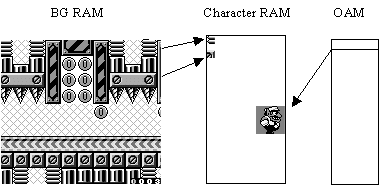
Game Boy Color expands on the design of Game Boy graphics architecture to produce color images in two different ways:
Like a "colorized" Hollywood movie, it is possible to add color to an existing, monochrome game without actually changing the content of the game itself. For "colorized" Game Boy games (limited to 10 colors), the shades of gray seen on Game Boy can be replaced with colors on Game Boy Color. This is accomplished by defining those colors in a special group of registers before starting the normal game code. This allows the programmer to define one palette of four colors for the background, and one or two palettes of 3 colors each for the objects. The graphic data itself does not need to be modified at all (although the results may not be optimal.) See A. DMG/MGB "colorized" model below.
To produce the full range of 56 possible colors, more memory was added to the BG RAM area. Using this additional memory, each screen location points not only to character data, but also to one of eight palettes of four colors each.
For the objects, they also gain more memory to allow a pointer to one of eight palettes of three colors each.
To accommodate additional character data which might be required in a color game, the character RAM was increased in size. Also to facilitate moving all of this data about, the DMA system has been increased in both speed and capability.
Types of Games Compatible with Game Boy Color Hardware
There are basically three different types of games that can be used on Game Boy Color, as described below.
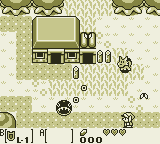
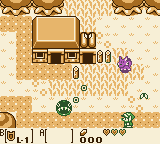
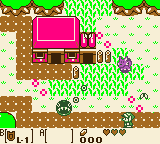
A monochrome game is a traditional Game Boy game, designed for the original Game Boy and Game Boy pocket. All games released up until this point, fall into this category. Like Super Game Boy, Game Boy Color can apply colors to the screen in place of the shades of gray normally seen on Game Boy when playing these games. Below are two images of the same game, on Game Boy and then on Game Boy Color:
|
|
|
|
Although Game Boy provides for 2 palettes of three colors for OBJs and one palette of four colors for backgrounds (BG) the net result was always four shades of gray. Because of this, most monochrome Game Boy games do not really utilize the second OBJ palette in a way that yields much improvement when displayed in color on Game Boy Color. As an example, in most games both enemies and the main character are OBJs, and share the same color palette.
Game Boy Color Built-In Color Palettes
When a monochrome game is played on Game Boy Color, you can select between 12 different, pre-defined color palettes. When the Game Boy logo is visible immediately after turning on Game Boy Color (with monochrome game installed), press one of the button combinations below to select the desired color palette:
|
|
|
|
|
| <none> | Green & Blue | Red | Red |
| Up | Brown | Brown | Brown |
| Up + A | Red | Green | Blue |
| Up + B | Dark Brown | Brown | Brown |
| Left | Blue | Red | Green |
| Left + A | Dark Blue | Red | Brown |
| Left + B | Gray | Gray | Gray |
| Down | Yellow, Red, Blue | Yellow, Red, Blue | Yellow, Red, Blue |
| Down + A | Yellow & Red | Yellow & Red | Yellow & Red |
| Down + B | Yellow | Blue | Green |
| Right | Green & Red | Green & Red | Green & Red |
| Right + A | Green & Blue | Red | Red |
| Right + B | Reverse | Reverse | Reverse |
The color of the game cannot be changed after the game title screen appears.
Type 2: Dual-Mode (Compatible) Games
It is possible to make games that are compatible with Game Boy and yet run with as many as 56 colors when played on Game Boy Color. There are many ways and degrees to which this can be accomplished, but in general terms it can be reduced to three basic programming ideas or models. These are not exact models, but rather general approaches to creating Game Boy games that can run on both color and monochrome hardware.
Basically still a Game Boy game, (no GBC features are available since bit 143h in the header identifies this as a Game Boy game) this model uses a simplistic technique to provide 7 to 10 colors. The background (BG) data can use up to four colors, where the objects (OBJs) can refer to two palettes of three colors each. Therefore, a total of 10 possible colors exist, by simply re-assigning the screen data to use different color palettes. Using this model, it is relatively simple to add color to, or "colorize" an existing monochrome Game Boy game with minimal programming and artwork changes.
|
|
The key difference between a Colorized DMG/MGB game and playing the original Game Boy game on Game Boy Color is that the colors palettes can be created specifically for this game, rather than selecting from one of the pre-defined color palettes.
| CAUTION: If you are considering creating a Colorized DMG/MGB game, you must first submit the concept to Nintendoís Product Support Group for pre-approval. Nintendo may not approve your game unless it offers significant, new game play value for the consumer, as well as pleasing graphics. You are encouraged to work closely with NOA Product Support Group and Mario Club throughout the development process to ensure that your game will be approved by Mario Club. |
An example of a Colorized DMG/MGB game is provided in the programming sample, COLORIZE.
A Dual-engine game is one in which two separate game engines (programs) and separate sets of screen data exist in a single Game Pak, one for use on monochrome Game Boy and one for Game Boy Color. A small "bootstrap" or startup program determines which type of Game Boy is being used and launches the appropriate game engine. Because one game is written specifically for Game Boy Color, it is essentially a Game Boy Color Dedicated game, as described below.
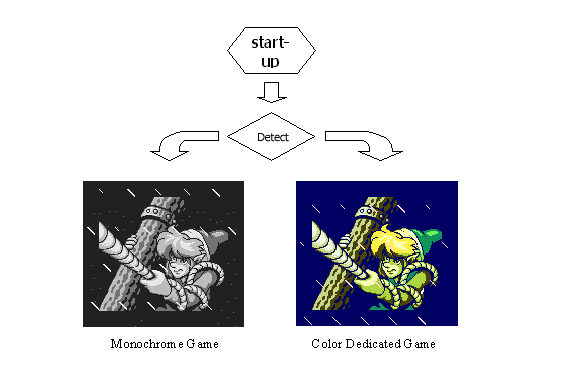
An example of a dual -engine compatible game is provided in the programming sample, DUAL.
An adaptive game is one in which the core game engine is essentially the same regardless which machine is presently running the game. Artwork and certain functions or subroutines are adapted or substituted during the game depending on whether the game is running on Game Boy or Game Boy Color.
It is technically possible and perfectly acceptable for an adaptive model game to use Game Boy Color advanced features such as expanded work RAM or high speed CPU. However, since the game must play equally well on Game Boy and Game Boy Color it may be challenging to find ways in which the GBC-specific features could be used effectively.
An example of an Adaptive game is provided in the programming sample, ADAPTIVE.
Type 3: Game Boy Color Dedicated Games
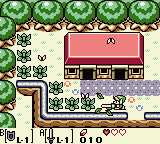
This type of game is written exclusively for use on Game Boy Color, and as such it cannot be played on Game Boy, Game Boy pocket or Super Game Boy. A Game Boy Color Dedicated game can, and by definition does, take advantage of some or all of the new features of Game Boy Color. It is the use of these features which prevents the game from running on the original Game Boy. It is also the integral use of these features in the game design that should differentiate this type of game from a Dual-Mode Game.
|
|
Playing Game Boy Color Dedicated Games On Game Boy
Although they will be a different color, it is physically possible for a consumer to plug Game Boy Color Dedicated games into their Game Boy, Game Boy pocket and Super Game Boy hardware. Therefore, a Game Boy Color Dedicated game must include a hardware check on power up which will display the following message when it is connected to non-Game Boy Color device:
An example of a Game Boy Color Dedicated game is provided in the programming sample, DEDICATE.
Converting Games for Game Boy Color
As described previously, it is relatively easy to "colorize" a Game Boy game for use on Game Boy Color using the Colorized DMG/MGB programming model. However, this may lead to a consumer disappointment if the game is not improved over the original game in some way other than simple colorization. To prevent this situation, Colorized games must be pre-approved by the Product Support Group. Nintendoís Mario Club will evaluate Colorized DMG/MGB games to ensure that the game provides game play enhancements beyond simply adding 7 to 10 colors to the game. Such enhancements might include: additional levels or areas, game play elements based on color, etc.
The increased power and capabilities of Game Boy Color have led many to speculate about converting popular NES games to Game Boy Color. On the surface, it might seem simple, but in reality there is quite a bit of work required. Below are some of the key issues that must be addressed to convert a game from NES:
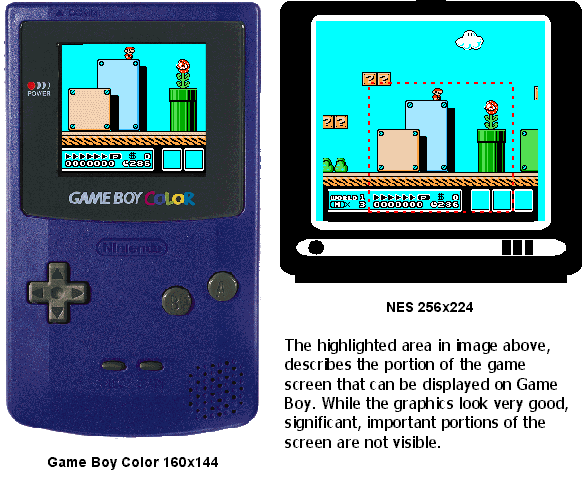
Various tools are available from Nintendo for use in the development of Game Boy Color games. Detailed descriptions, pricing and availability information is available from Nintendoís Parts Department, but here is a quick overview:
The GBC Emulator is a development support tool for transferring user programs to Game Boy Color and Game Boy for execution and checking. This is useful not only for the programmer, but for artists, designers, testers and marketing purposes. The emulator is provided with an assembler and linker.
GBC Debugger is built upon the GBC Emulator above, but also provides a full Windows-based, source-level debugger for the programmer.
Game Boy Color Character Editor
GBC Character Editor is a development support tool that lets an artist or designer immediately compose and edit Game Boy graphics and color palettes in a Windows environment with immediate preview on the GBC Emulator described above.
Other tools available for Game Boy and Game Boy Color development include: Game Boy Flash ROM writer, Game Boy Flash ROM development boards, pre-production Game Boy Color hardware. Contact Nintendoís Parts Department or Developer Support Group for information on these products.
New, high speed ROMs are available for Game Boy Color games. Game Boy Color Game Paks will also be a different color than Game Boy Game Paks to help the consumer differentiate the games. These new ROMs are available in the following configurations:
|
|
|
|
| 8 Mbit | 0Kbit | MBC 5 |
| 8 Mbit | 64Kbit (with battery) | MBC 5 |
| 8 Mbit | 256Kbit (with battery) | MBC 5 |
| 16 Mbit | 0Kbit | MBC 5 |
| 16 Mbit | 64Kbit (with battery) | MBC 5 |
| 16 Mbit | 256Kbit (with battery) | MBC 5 |
| 32 Mbit | 0Kbit | MBC 5 |
| 32 Mbit | 64Kbit (with battery) | MBC 5 |
| 32 Mbit | 256Kbit (with battery) | MBC 5 |
Monochrome Game Boy will continue to use the existing Game Pak configurations and prices.
Game Boy Color supports all previous Game Boy memory bank controllers (MBC1, MBC2 and MBC3, in addition to the new, MBC 5. The MBC 5 is required for games which utilize the high speed CPU mode of Game Boy Color. The MBC 5 provides all of the functionality of the MBC1-MBC3 except the clock function of the MBC3.
Contact Nintendoís Licensing Department for the latest configuration, availability and pricing information for Game Boy Color.
Nintendo has developed extensive packaging guidelines for Game Boy Color, which are available from Nintendoís Licensing Department.
Programming Requirements and Cautions
All of the existing Game Boy Programming Requirements and Cautions apply to Game Boy Color in addition to information unique to Game Boy Color. The complete list is available from Nintendoís Engineering Department.
With the exception of Colorized DMG/MGB games, no concept pre-approval or interim ROM is required for Game Boy Color games. When you game is completed, it should be submitted to Nintendoís Mario Club for approval. Following approval by Mario Club, the game can then be submitted to Lot Check. Before a game can receive final approval from Lot Check, the packaging must be submitted and approved by the Licensing Department.
For colorized DMG/MGB games, both concept pre-approval and one interim ROM review (at 50% completion) are required.
Programming Examples and Additional Information
The programming examples referenced in this document can be downloaded from Wario World (Nintendoís Developer Support Web Site). Wario World can be reached at HTTP://www.noa.com.
Other questions regarding Game Boy Color development should be addressed to Nintendo Developer Support Group at or (425) 861-2736.